

RunCat Neo 顯示 Claude Code 與 Codex 用量:Desktop 排錯與設定

RunCat 是我自己一直很喜歡的 macOS 小程式。平常讓貓咪在選單列跑著,看 CPU 使用量決定牠的速度,沒有打擾感,卻又能隨時注意電腦是不是突然忙起來。
這幾天 RunCat 改版,我也跟著更新,才注意到 RunCat Neo 裡面可以設定 Custom Metrics。除了原本的系統資訊,只要準備符合格式的 JSON,就能把自己想看的資料加進 Dashboard 與選單列。看到這個功能後,我第一個想到的就是:能不能把 Claude Code 與 Codex 的 Context、5 小時/7 天額度也放進去?這就是這篇文章的起點。
官方範例本身不複雜:AI coding 工具輸出一份 JSON,RunCat Neo 負責監看檔案並顯示內容。
真正花時間的是 Desktop 版的行為與 CLI 不完全相同。Claude Desktop 的 Code Local 在我的環境裡只送出模型名稱,沒有完整的 Context 與 Rate Limit;Codex Desktop 則沒有出現官方安裝流程需要的 /hooks 信任入口。最後我的設定是:Claude 保留官方 status line,完整額度以已登入的 CLI 更新;Codex Desktop 改由 macOS launchd 每 30 秒讀取本機 session。
這篇記錄 2026 年 7 月在 macOS 與 RunCat 12.7 的實際安裝方式。相關欄位與 Desktop 行為可能隨版本調整,排錯時請以 JSON 的更新時間與實際欄位為準。
先理解 RunCat Neo 在這套設定裡做了什麼
RunCat Neo 不會登入 Claude 或 Codex,也不會主動執行腳本。Custom Metrics 的資料流是:
Claude Code status line/Codex hook/launchd ↓ 更新本機 JSON ↓ RunCat Neo 監看檔案變化 ↓ Dashboard/Metrics Bar因此卡片沒有更新時,不要先重裝 RunCat。第一個要檢查的是 JSON 檔案有沒有變動:
stat -f '%Sm %N' ~/.claude/runcat-usage.json ~/.codex/runcat-usage.json只要檔案時間沒有變,問題就在上游的 status line、hook 或背景服務;RunCat 只是繼續顯示上一次成功寫入的內容。
設定 Claude Code Custom Metrics
RunCat Neo 專案已提供 Claude Code 範例。先下載腳本並加上執行權限:
mkdir -p ~/.claude
curl -fsSL \ https://raw.githubusercontent.com/runcat-dev/RunCatNeo/main/docs/samples/claude-code/runcat-statusline.py \ -o ~/.claude/runcat-statusline.py
chmod +x ~/.claude/runcat-statusline.py接著在 ~/.claude/settings.json 加入 statusLine。請用 $HOME 確認自己的實際家目錄,再將 JSON 裡的路徑換成絕對路徑:
echo "$HOME"{ "statusLine": { "type": "command", "command": "/Users/你的帳號/.claude/runcat-statusline.py" }}不要覆蓋原本的 settings.json如果設定檔裡已有
hooks、外掛或其他選項,只要新增statusLine欄位,不要整份換掉。hooks與statusLine是不同功能,原有的其他 hook 可以保留。
已有 statusLine 時不能直接再加第二個
Claude Code 只接受一個 statusLine.command。如果原本已有自訂狀態列,直接把 command 換成 RunCat 腳本,舊狀態列就不會執行。
我的做法是保留一個入口腳本,讓它同時處理終端機狀態列與 RunCat JSON。概念如下:
#!/bin/shinput=$(cat)
printf '%s' "$input" | ~/.claude/runcat-statusline.py >/dev/nullprintf '%s' "$input" | ~/.claude/my-statusline.sh再把 statusLine.command 指向這個合併後的腳本。若原有腳本本身也會讀取 stdin,必須先像上面一樣把輸入保存起來,否則第一支程式讀完後,第二支會拿不到資料。
完成一個 Claude Code 回合後,檢查輸出:
python3 -m json.tool ~/.claude/runcat-usage.json正常情況會看到 Model、Context、5h、7d;其中百分比是「已使用」,不是「剩餘」。官方文件也說明,rate_limits 只會在 Claude.ai Pro/Max 訂閱者完成第一個 API 回覆後出現。
Claude Desktop 的問題:有執行腳本,不代表有完整額度
這是我設定時最容易誤判的地方。
我在 Claude Desktop 的 Code → Local 工作階段測試時,runcat-usage.json 確實有更新,模型名稱也正確,代表 Desktop 有呼叫 status line;但輸入資料沒有 context_window 與 rate_limits,RunCat 卡片因此只顯示 Model。
改用已登入的 Claude Code CLI 並完成一個實際回合後,Context、5h、7d 才完整出現。也就是說,在這次實測環境裡:
| 使用方式 | Model | Context | 5h/7d |
|---|---|---|---|
| Claude Code CLI(已登入) | 有 | 有 | Pro/Max 回合可取得 |
| Claude Desktop Code Local | 有 | 未取得 | 未取得 |
| Claude Desktop 一般 Chat | 不會走這套 status line | 不會 | 不會 |
| Remote/SSH 工作階段 | 寫在執行端 | 視執行端資料 | 本機 RunCat 不會直接看到遠端 JSON |
這是版本與環境實測,不是永久規格Claude 官方文件目前把 Context 與 Rate Limit 列為 status line 可用欄位,也在 Desktop 提供獨立的 usage ring;但這不代表每個 Desktop Code Local 版本都會把相同欄位送進自訂 status line。最可靠的判斷方式仍是檢查 JSON,而不是只看卡片有沒有建立。
若 CLI 也只有 Model,依序確認:
- CLI 是否已登入正確的 Claude.ai Pro/Max 帳號。
- 是否已完成第一個 API 回覆,而不是只啟動程式。
~/.claude/runcat-usage.json的修改時間是否更新。- 工作區是否已接受 trust,讓 status line command 可以執行。
如果主要都使用 Desktop,完整的 5h/7d 額度可直接看 Desktop 模型選擇器旁的 usage ring;不要把只有 token 的本機紀錄偽裝成訂閱 Rate Limit。
Codex 官方 hook 在 Desktop 卡住的地方
Codex 官方範例也是在每個回合結束後產生 JSON:
mkdir -p ~/.codex
curl -fsSL \ https://raw.githubusercontent.com/runcat-dev/RunCatNeo/main/docs/samples/codex/runcat-hook.py \ -o ~/.codex/runcat-hook.py
chmod +x ~/.codex/runcat-hook.py~/.codex/hooks.json 的 Stop hook 可以這樣設定:
{ "hooks": { "Stop": [ { "hooks": [ { "type": "command", "command": "/Users/你的帳號/.codex/runcat-hook.py", "timeout": 5 } ] } ] }}若原本已有 Stop hook,請把 RunCat command 加進既有陣列,不要移除其他工具。官方流程接著要求重啟 Codex、開啟 /hooks 並信任新增的 command。
問題是我只使用 Codex Desktop,輸入框裡沒有 /hooks。結果 session 已持續更新,~/.codex/runcat-usage.json 卻停在舊時間;這代表 RunCat 沒壞,而是新 command 沒有被執行。
如果願意開一次 CLI,可以在支援 /hooks 的介面完成信任後再回 Desktop。但我不想為了這張卡改用 CLI,所以最後移除未生效的 RunCat Stop hook,改成 launchd 定時更新。
不用 Codex CLI:用 launchd 每 30 秒更新
這個替代方案直接讀取 ~/.codex/sessions/ 最新的本機 transcript,找出模型、Context、Rate Limit 與最近的 Full reset,再寫成 RunCat JSON。
先建立 ~/.codex/runcat-refresh.py:
#!/usr/bin/env python3import jsonimport osimport tempfilefrom datetime import datetime, timezonefrom pathlib import Path
sessions = Path.home() / ".codex" / "sessions"output = Path.home() / ".codex" / "runcat-usage.json"
files = list(sessions.rglob("*.jsonl"))if not files: raise SystemExit(0)
transcript = max(files, key=lambda path: path.stat().st_mtime)model = "Codex Desktop"token_count = None
with transcript.open(encoding="utf-8") as source: for line in source: try: event = json.loads(line) except json.JSONDecodeError: continue payload = event.get("payload") or {} if event.get("type") == "turn_context" and payload.get("model"): model = payload["model"] if payload.get("type") == "token_count": token_count = payload
metrics = [{"title": "Model", "formattedValue": model}]bar_value = Noneinfo = (token_count or {}).get("info") or {}usage = (info.get("last_token_usage") or {}).get("total_tokens")window = info.get("model_context_window")
if isinstance(usage, (int, float)) and isinstance(window, (int, float)) and window > 0: percent = max(0, min(100, usage / window * 100)) bar_value = f"{percent:.1f}%" metrics.append({ "title": "Context", "formattedValue": bar_value, "normalizedValue": round(percent / 100, 4), })
resets = []rate_limits = (token_count or {}).get("rate_limits") or {}for key in ("primary", "secondary"): limit = rate_limits.get(key) or {} minutes = limit.get("window_minutes") used = limit.get("used_percent") reset = limit.get("resets_at") if isinstance(minutes, (int, float)) and isinstance(used, (int, float)): title = f"{minutes / 1440:g}d" if minutes % 1440 == 0 else f"{minutes / 60:g}h" metrics.append({ "title": title, "formattedValue": f"{used:g}%", "normalizedValue": round(max(0, min(100, used)) / 100, 4), }) if isinstance(reset, (int, float)): resets.append(reset)
if resets: reset_at = datetime.fromtimestamp(min(resets)).astimezone() metrics.append({"title": "Full reset", "formattedValue": reset_at.strftime("%m/%d %H:%M")})
snapshot = { "title": "Codex", "symbol": "camera.aperture", "metrics": metrics, "lastUpdatedDate": datetime.now(timezone.utc).strftime("%Y-%m-%dT%H:%M:%SZ"),}if bar_value: snapshot["metricsBarValue"] = bar_value
output.parent.mkdir(parents=True, exist_ok=True)fd, temporary = tempfile.mkstemp(prefix=".runcat-", dir=output.parent)with os.fdopen(fd, "w", encoding="utf-8") as target: json.dump(snapshot, target, ensure_ascii=False)os.replace(temporary, output)加上執行權限並手動測試:
chmod +x ~/.codex/runcat-refresh.py~/.codex/runcat-refresh.pypython3 -m json.tool ~/.codex/runcat-usage.json接著建立 ~/Library/LaunchAgents/dev.runcat.codex-refresh.plist。ProgramArguments 請改成自己的絕對路徑,launchd 不會在這裡替你展開 ~:
<?xml version="1.0" encoding="UTF-8"?><!DOCTYPE plist PUBLIC "-//Apple//DTD PLIST 1.0//EN" "http://www.apple.com/DTDs/PropertyList-1.0.dtd"><plist version="1.0"><dict> <key>Label</key> <string>dev.runcat.codex-refresh</string> <key>ProgramArguments</key> <array> <string>/usr/bin/python3</string> <string>/Users/你的帳號/.codex/runcat-refresh.py</string> </array> <key>StartInterval</key> <integer>30</integer> <key>RunAtLoad</key> <true/></dict></plist>載入並確認服務:
launchctl bootstrap gui/$(id -u) ~/Library/LaunchAgents/dev.runcat.codex-refresh.plistlaunchctl print gui/$(id -u)/dev.runcat.codex-refresh修改腳本或 plist 後,可先卸載再重新載入:
launchctl bootout gui/$(id -u)/dev.runcat.codex-refreshlaunchctl bootstrap gui/$(id -u) ~/Library/LaunchAgents/dev.runcat.codex-refresh.plist這套設定不需要 Codex hook 信任,Desktop 工作時最慢約 30 秒更新。代價是它依賴 Codex 本機 session 的 JSONL 結構;RunCat 官方範例也特別提醒,Codex 更新後 transcript 格式可能改變,失效時要重新比對最新的 token_count event。
另外,Full reset 在這裡是 Rate Limit 視窗裡最近的 resets_at,不是帳號介面顯示的 banked reset 次數。可手動使用幾次 Full reset、每次何時到期,目前不在這份本機 token event 裡,不能可靠地自動同步。
把兩份 JSON 加進 RunCat Neo
在 RunCat Neo 開啟:
Settings → Metrics → Custom Metrics → Add JSON Source依序選取:
~/.claude/runcat-usage.json~/.codex/runcat-usage.jsonmacOS 檔案選擇器看不到 .claude、.codex 時,可以按 Command + Shift + . 顯示隱藏檔,或按 Command + Shift + G 後貼上完整路徑。
Custom Metrics 卡片出現後,還要到 Metrics Bar 把對應來源切換為啟用,Context 百分比才會出現在選單列。新增 JSON Source 與啟用 Metrics Bar 是兩個不同步驟。
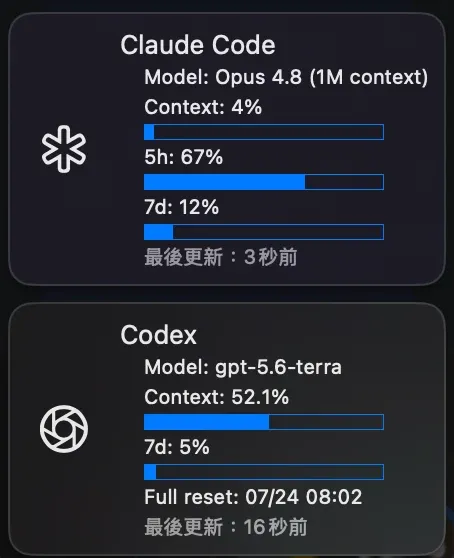
RunCat Neo 成功讀取兩份本機 JSON。Codex Desktop 透過 launchd 定期刷新,因此兩張卡片的最後更新時間可能相差數秒。
我的最後設定與取捨
最後我保留的方式如下:
| 工具 | 更新來源 | 更新時機 | 限制 |
|---|---|---|---|
| Claude Code | 官方 status line | 每次 CLI 互動後 | Desktop Local 實測拿不到完整 Context/5h/7d |
| Codex Desktop | launchd + 本機 session | 每 30 秒 | Codex 更新後可能要調整 JSONL parser |
| RunCat Neo | 監看兩份 JSON | 檔案變動時 | 不主動抓 API,也不執行腳本 |
這套做法的重點不是把所有帳號頁面都搬進選單列,而是把真正能從本機可靠取得的 Context 與 Rate Limit 顯示出來。Claude Desktop 欄位不完整時就保留限制;Codex Desktop 沒有 hook 信任入口時,改由 launchd 更新,至少資料來源與更新週期都是清楚的。
如果你正在安排 Codex 長任務,可以接著看Codex 週限制與 Reset 實測整理;Claude 的訂閱額度與 API credits 則可參考Claude Code 用量檢查表。若卡片完全不動,Claude Code 官方事故與本機問題判斷裡的分層排錯方式也能直接套用。
常見問題
Q: RunCat Neo 為什麼一直顯示舊資料?
A: 先用 stat 檢查 runcat-usage.json 的修改時間。如果時間沒有更新,代表 Claude status line、Codex hook 或 launchd 沒有寫入新資料;如果 JSON 時間有更新但卡片不動,再回頭檢查 RunCat 的 JSON Source 路徑與檔案內容是否有效。
Q: Claude Desktop Code Local 可以顯示 5h 與 7d 用量嗎?
A: 在本文 2026 年 7 月的實測環境中,Desktop Local 有呼叫 status line,也能寫入模型名稱,但沒有傳入完整的 Context 與 Rate Limit 欄位;已登入的 Claude Code CLI 完成 API 回覆後才能取得。不同版本可能改變,請以 status line 實際收到的 JSON 為準。
Q: Codex Desktop 沒有 /hooks,還能更新 RunCat 嗎?
A: 可以。本文改用 macOS launchd 每 30 秒讀取 ~/.codex/sessions/ 最新 transcript,再產生 ~/.codex/runcat-usage.json。這不依賴 Stop hook 信任,但 Codex 更新若改變 JSONL 格式,背景腳本也要跟著調整。
Q: RunCat 顯示的百分比是已用還是剩餘?
A: 本文腳本顯示的是已使用百分比。7d 80% 代表七天視窗已使用 80%,不是還剩 80%。normalizedValue 也用相同比例繪製進度;如果要顯示剩餘額度,必須明確改成 100 - used_percent 並同步修改標題。
Q: Full reset 為什麼沒有顯示可用次數?
A: Codex 本機 token_count event 有 Rate Limit 視窗的 resets_at,所以能顯示最近的完整重設時間;但 banked reset 的可用次數與各自到期日不在這份資料裡。這些資訊仍應以 Codex 帳號使用量介面為準,不能從現有本機 session 可靠推算。
參考資料:
RunCat Neo:Claude Code Integration Sample
RunCat Neo:Codex Integration Sample